SAP Ariba SLP Integration with S/4HANA: Complete 2026 Guide
Learn how SAP Ariba SLP integrates with S/4HANA: architecture, MDG-S, Managed Gateway, business partner replication, prerequisites and setup checklist.
If your supplier onboarding lives in SAP Ariba Supplier Lifecycle and Performance (SLP) but your purchase orders, invoices and payments run in SAP S/4HANA, then one question decides whether the whole process works: how do suppliers get from SLP into S/4HANA, and stay in sync?
In this guide I explain how SAP Ariba SLP integration with S/4HANA works in 2026: the architecture, when you need SAP Master Data Governance (MDG-S), the role of the Managed Gateway, the business partner web services involved, prerequisites, a setup checklist and the errors that trip up most projects.
What Is SAP Ariba SLP?
SAP Ariba Supplier Lifecycle and Performance (SLP) is SAP's cloud solution for managing suppliers end to end:
- Supplier registration and onboarding through configurable questionnaires
- Qualification by category and region
- Supplier 360 profile with certificates, bank and tax data, and risk information
- Preferred supplier management and segmentation
- Performance evaluations and supplier scorecards
- Disqualification and phase-out
SLP is where supplier data is collected and approved. S/4HANA is where that supplier is used: for purchasing, goods receipt, invoice verification and payment. Integration connects the two.
Why Integrate SAP Ariba SLP with S/4HANA?
Without integration, a procurement team approves a supplier in SLP and then someone re-keys the same data into S/4HANA. That leads to:
- Duplicate or mismatched supplier records
- Wrong bank details and payment risk
- Delays between "supplier approved" and "supplier can receive a PO"
- No single source of truth for audits
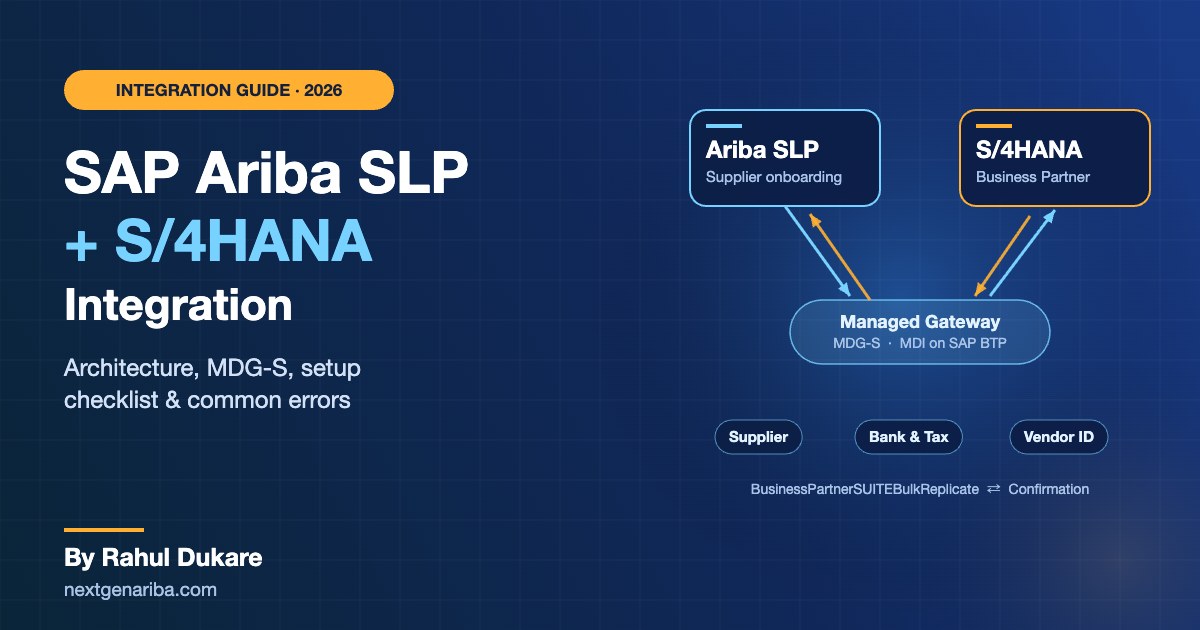
With SAP Ariba SLP and S/4HANA integration, an approved supplier is automatically created as a business partner (BP) in S/4HANA. The ERP vendor ID then flows back to SLP, so both systems reference the same supplier.
SAP Ariba SLP Integration Architecture
The integration is bidirectional. Supplier data can move from SLP to S/4HANA and from S/4HANA back to SLP.
Connectivity options
| Option | How it works | Best for |
|---|---|---|
| Direct connectivity | Point-to-point connection between SAP Ariba and your SAP backend, typically via SAP Cloud Connector | Simple landscapes with one ERP |
| Managed Gateway for Spend Management and SAP Business Network (formerly Cloud Integration Gateway, CIG) | SAP-managed middleware that maps, routes and monitors messages | Most projects; multi-system landscapes; easier monitoring |
| SAP Master Data Integration (MDI) on SAP BTP | Business partner data is distributed through MDI to S/4HANA | SAP S/4HANA Cloud Public Edition |
Do you need SAP MDG-S?
This is the most common design question. SAP's guidance is clear:
- Single SAP backend: replicating supplier data from SAP Ariba to one SAP system does not necessarily require SAP Master Data Governance for Suppliers (MDG-S).
- Multiple ERPs: replicating supplier data to a multi-ERP landscape requires a standalone MDG-S hub that governs and distributes the supplier.
MDG-S adds governance workflows, duplicate checks and data quality rules before a supplier reaches ERP. That is valuable even with one ERP if you have strict master data controls.
The web services behind the integration
SLP and S/4HANA exchange business partner data using standard SOAP services:
BusinessPartnerSUITEBulkReplicateRequest(inbound and outbound)BusinessPartnerSUITEBulkReplicateConfirmation(inbound and outbound)
The request carries the supplier. The confirmation returns the result, including the S/4HANA business partner and vendor numbers, so SLP can map them. The Managed Gateway groups these into two document types you can monitor in its portal.
How the Supplier Data Flow Works
A typical SLP to S/4HANA supplier replication looks like this:
- Supplier registers in SLP by completing the registration questionnaire.
- Internal approval runs in SLP (procurement, finance, compliance).
- SLP sends the supplier as a business partner request through the Managed Gateway (or MDG-S / MDI).
- S/4HANA (or MDG-S) creates the business partner with the supplier role, bank, tax and address data.
- A confirmation message returns the ERP vendor ID to SLP.
- Updates flow both ways. Changes in SLP (for example, new bank details) are sent to S/4HANA, and suppliers created in S/4HANA can be replicated into SLP.
Prerequisites for SAP Ariba SLP Integration
Before you start, confirm the following (from SAP's official SLP integration course):
- SLP integration features enabled on your SAP Ariba site (via a service request)
- Managed Gateway enabled for your SAP Ariba realm
- SAP S/4HANA 1809 or higher (on-premise), or SAP ERP 6.0 EhP 8 SP12+
- SAP MDG 9.2 (add-on for ERP 6.0 EhP 8 SP12+, or on S/4HANA 1809+) if you use MDG-S
- SAP Cloud Connector configured if you use direct connectivity
- RFC destinations set up for a standalone MDG-S hub
Key restrictions to know
- Integration supports the business partner supplier segment only. Do not replicate customers, persons or groups.
- MDG-S custom fields are not supported in the standard integration.
- Integration with SAP Ariba Supplier Risk is one-way (replication to Supplier Risk only).
Step-by-Step Setup Checklist
Every project differs, but most SAP Ariba SLP S/4HANA integration projects follow these steps:
- Design the master data model. Map SLP questionnaire fields to BP fields: name, address, tax numbers, bank, purchasing organization and company code data.
- Enable SLP ERP integration in SAP Ariba and set the ERP integration parameters.
- Set up the Managed Gateway. Create the integration project, add your S/4HANA (or MDG-S) system and configure the business partner connections.
- Configure S/4HANA. Activate the business partner SOAP services, set up BP number ranges and groupings, and configure the supplier role, reconciliation account, payment terms and tax categories.
- Configure MDG-S if used: change request types, workflows and replication model.
- Set up key mapping so SLP supplier IDs map to S/4HANA BP and vendor numbers.
- Test end to end: new supplier, update, bank change, block and multi-company-code scenarios.
- Plan the initial load. Replicate existing S/4HANA vendors into SLP before go-live so you don't create duplicates.
For SAP S/4HANA Cloud Public Edition
Public Cloud projects typically route business partner data through SAP Master Data Integration (MDI) on SAP BTP:
- Create MDI service instances for SLP and S/4HANA on SAP BTP.
- In SLP, enable MDI-related parameters and set the ERP Business System ID to the MDI subdomain ID in lower case. This is not the S/4HANA own system ID.
- In S/4HANA, set up communication arrangement SAP_COM_0008 for business partner replication.
- In the Managed Gateway, use the SAP Ariba service key (not the S/4HANA key) for the connections.
- Note: key mapping is distributed on initial supplier creation, not on every update.
Common SLP Integration Errors (and How to Fix Them)
| Error | Typical cause | Fix |
|---|---|---|
| BP rejected in S/4HANA | Missing tax number category or invalid region code | Align SLP values with S/4HANA configuration and value mappings |
| Supplier created without vendor ID in SLP | Confirmation message not returned or failed | Check the confirmation service and Managed Gateway monitoring |
| Duplicate suppliers | No initial load or key mapping | Load existing vendors into SLP first; enable key mapping |
| Bank data not updated | Field mapping or change logic missing | Map bank fields and test update scenarios |
| Reconciliation account errors | Missing company code data defaults | Configure default reconciliation account per BP grouping |
Best Practices from Real Projects
- Make SLP the single entry point for new suppliers. Block direct vendor creation in S/4HANA where possible.
- Keep questionnaires lean. Collect only what ERP and compliance truly need.
- Clean your vendor master before the initial load. Integration will not fix bad data; it copies it.
- Monitor daily in the first weeks. Most issues are value mapping gaps that appear only with real suppliers.
- Plan for Next-Gen SAP Ariba. SAP's rebuilt platform on SAP BTP promises a unified data layer and 360-degree supplier profiles with AI-assisted risk. Clean master data and a sound integration design today will make that move easier.
Frequently Asked Questions
What is SAP Ariba SLP?
SAP Ariba Supplier Lifecycle and Performance (SLP) is SAP's cloud solution for supplier registration, qualification, segmentation, performance management and phase-out.
How does SAP Ariba SLP integrate with S/4HANA?
SLP replicates approved suppliers to S/4HANA as business partners using the BusinessPartnerSUITEBulkReplicate web services, usually through the Managed Gateway. S/4HANA returns a confirmation with the vendor ID. The integration is bidirectional.
Do I need MDG-S for SAP Ariba SLP integration?
Not for a single SAP backend. MDG-S is required when you replicate suppliers to multiple ERP systems, and it is recommended if you need strong master data governance.
Can SLP integrate with SAP S/4HANA Cloud Public Edition?
Yes. Public Cloud integrations typically use SAP Master Data Integration (MDI) on SAP BTP, the Managed Gateway and communication arrangement SAP_COM_0008.
Does SLP integration support custom fields?
MDG-S custom fields are not supported in the standard integration. Plan extensions carefully and validate them with SAP documentation.
Final Thoughts
A well-designed SAP Ariba SLP integration with S/4HANA turns supplier onboarding into a single, controlled process: register once in SLP, approve once, and use the supplier immediately in S/4HANA. Get the architecture decision right (direct, Managed Gateway, MDG-S or MDI), clean your data before go-live, and test update scenarios as carefully as new suppliers.
Planning an SLP integration or struggling with an existing one? Talk to the Next Gen Ariba team or see our Ariba integration and support services.
Related reading: What Is SAP Ariba? A Practical Guide for Mid-Size Businesses · Next-Gen SAP Ariba & Joule AI Agents: What Procurement Teams Need to Know in 2026
Sources: SAP Learning – Understanding SLP Integration, SAP Learning – SLP Integration Stipulations, SAP Community – Integrating SLP with S/4HANA Public Cloud using MDI, SAP How-To Guide – MDG with SLP.